Showing posts with label MSBuild. Show all posts

Friday, February 27, 2015

More Azure in the TFS vNext (2015) and no more WF in Builds Alleluia !


Remember my good old posts back in 2010, claiming that Batch scripts offers a great ROI :

Now, in 2015, guess what ?? Yes, Scripts are back !!
I was so pleased when installing TFS 2015 (CTP) where Builds were identified as “legacy” !! and yet also anxious, since it means throwing away a large amount of previous knowledge !


LIST OF NEW TFS 2015 FEATURES:

  • Assign multiple testers
  • Team Build preview
  • REST APIs
  • Service hooks
  • Sprint backlog and task board updates
  • Text filtering on backlogs & queries
  • Re-ordering in a filtered backlog
  • Edit on the Kanban board
  • Identity control and avatars
  • History control
  • View history on a folder
  • Improved merge performance
  • Query progressive disclosure


Here is the TFS 2015 CTP install process:

image

Once installed the documentation clearly scores out the “BUILD” tab and highlights the BUILD.VNEXT one:

image

image

Now the (new vNext) build are configured via the Web portal

image

and for those like me how hated to install previous version of VS with add-on “just” to Clone a build definition, here is the new ‘magic’ button :

image

Now that TFS is installed (and you could still install and configure the legacy Build at the same time), let the fun starts :

  1. Choose the create a new build definition, and you’ll be presented the choice of building a VS or a Xcode
    image
  2. Let us consider a VS build, and you’ll have by default two Build steps: VS (building *.sln) and a VS Test (building test*.dll)
    image
  3. Now you could add a large amount of Build Steps, particularly spacial ones for Microsoft Azure
    (and I expect some much more in an Open Source manner)image
  4. Now re-order the Steps as you wish. No more complex parallel crazy workflows that spans across multiple pages that crashed my Visual Studio, yet having a powerful configuration. 
    image


    ==>
    BECOMES AFTER
    RE-ORDERING
    ==>

    image
     
  5. No more multiple pop-ups (like the old ones). Everything is accessible rapidly.
    image
  6. To configure the Agent with infinite extensible capabilities !
    image
  7. Even more extensibility with the new Service Hooks, that interract with Azure Service Bus, Azure Storage, … and JENKINS, Trello, etc…
    image
  8. Here is a Zoom on the two Azure Hook capabilities
    image


HOW TO USE THE SERVICE HOOKS ??

  1. For instance, when a TFS event raises (exhaustively : Build Completed, Code pushed, Pull request created, Pull request updated, Team room message posted, Work item commented on, Work item created, Work item updated).
  2. Say, choose “Build Completed”. Now, whenever a build is completed, the action below will be triggered :

    image


Other support for Microsoft Azure:

Ability to add a deployment environment.
image
 

Here is the exhaustive list of what’s new in TFS 2015 : https://www.visualstudio.com/en-us/news/tfs2015-vs

Saturday, July 27, 2013

Book review : StyleCop Code Analysis How-to

StyleCop Code Analysis How-to

http://bit.ly/19mPNkQ

I am a real fan of StyleCop and FxCop for the last 4 years or so (see how many rules FxCop+StyleCop).

Up until now, I have been only build up my knowledge from my own experience and reading blogs.

The small size of this book allows a broader vision rapidly, and covers things that I never had the time to implement on real projects (such as VS Templates, or files headers).

I also finally understood why my Resharper did not work with my StyleCop, which was an easy thing to fix.

It is worth reading !

Tuesday, June 14, 2011

Build Silverlight ServiceReferences.ClientConfig for Staging AND Prod environment

You want to automate Silverlight Build and Deployment with Team Build of the TFS 2010 ?

Well you will soon be faced to the problem related to the ServiceReferences.ClientConfig file.
Indeed, this file, which references the WCF services inside your *.xap, has to be different for every environment.

So how to automate something ??

Here are possible ways :
  • Don't use those files, but rather store the information in a file such as WebConfig. It is a net solution especially if you are a Software vendor with many different customer (you dont want to unzip and edit your file per customer, just deliver exactly the same *.xap). However, this solution is quite 'tecky' to modify your Silverlight code to work that way,
  • You could create a tool based on a library to unzip then edit your XAP, http://sharpdevelop.net/OpenSource/SharpZipLib/Default.aspx
  • You could manually use 7-Zip to edit the Xap (just associate *.xap to 7-Zip) and change "Localhost" to your new endpoint,
  • You could use for instance InstallShield / WIX installer to perform this task,
  • An elegant and automated way is to use the *.csproj and Team Build to do that.
                . ServiceReferences.Staging.ClientConfig
                . ServiceReferences.Prod.ClientConfig
    This is the solution detailed here after.
In a *.csproj you could have noticed the following commented lines :
  <!-- To modify your build process, add your task inside one of the targets below and uncomment it. Other similar extension points exist, see Microsoft.Common.targets.
  <Target Name="BeforeBuild">
  </Target>
  <Target Name="AfterBuild">
  </Target>
  -->


Using the include's functionnality of Microsoft.Common.targets (more info here or here) is the method used, except that we are going to do it for a TeamBuild 2010.


    <Content Include="ServiceReferences.ClientConfig">
      <SubType>DesignerSubType>
    Content>
    <Content Include="ServiceReferences.Staging.ClientConfig">
      <DependentUpon>ServiceReferences.ClientConfigDependentUpon>
    Content> 


Which gives the following in VS2010 :


Then, in the csproj, perform a conditional execution of a XCOPY. For instance use either Condition="'$(IsDesktopBuild)'=='true'" but it is no more supported. Or, prefer using  $(BuildingInsideVisualStudio)

  <!-- Detect if Build inside Visual Studio (i.e.) or Team Build TFS 2010 -->
    <Exec Condition="$(BuildingInsideVisualStudio)=='true'"
        Command="XCOPY ServiceReferences.Dev.ClientConfig ServiceReferences.ClientConfig /R /Y"
IgnoreExitCode="true" />
    <Exec Condition="$(BuildingInsideVisualStudio)!='true'"
        Command="XCOPY ServiceReferences.Staging.ClientConfig ServiceReferences.ClientConfig /R /Y"
IgnoreExitCode="true" />
    <Exec Condition="$(BuildingInsideVisualStudio)!='true'" 
        Command="DIR *.* > BuildingInsideVisualStudio_NotTrue.txt"
IgnoreExitCode="true" />
    <Exec Condition="$(BuildingInsideVisualStudio)=='true'"
        Command="DIR *.* > BuildingInsideVisualStudio_True.txt"
IgnoreExitCode="true" />
  Target>

Done !

Next step is to use the file ServiceReferences.Staging.ClientConfig the same way as a Web.Config file, that uses XSLT transform to decrease the amount of maintenance.

Wednesday, December 1, 2010

ALM + TFS 2010 + VS 2010 : Where to start ?

Where to start with your Application Lifecycle Management ?? based on Team Foundation Server 2010 and Visual Studio 2010


If you have feedbacks, please do so to improve this documentation


[updated] You could find complementary and/or similar information on Posts similar to this one:
. a handy spreadsheet by Terje Sandstrom
. and an MSDN one from Grant Holliday.


On large scale and critical projects, you can reach really high quality and standards :
  • by choosing a project management framework or combining them (as long as they are not incompatible: CMMI, ITIL, ISO, SCRUM, PMBOK, PRINCE2...)
  • by taking into account the user's needs (either by arranging the priorities or extend the existing contract),
  • by creating a great team,
  • by providing them great tools or resources, which is the matter of this Post. Moreover, most of them comes free of charge (indicated by the label  [Free]).
  • by blending with other great tools (that are not listed below, such as HP ALM 11 and its Quick Test Pro - Very expensive, but great),  
  • by taking into account your team's needs and feedbacks,
  • by adding some challenges (with regular independent audits),
  • by adding comments to this post so I can enhance it ;-)

0. Prerequisites
You obviously need VS2010 + TFS2010 : either get a 
.  TFS 2010 Ultimate trial  [Free],
. or get entire MS ALM (TFS 2010 +VS 2010 Ultimate with proper Service Pack and Powertools installed)    {for Virtual PC, for Hyper-V, ... that expires every so often. Google for "Microsoft® Visual Studio® 2010 and Team Foundation Server® 2010 RTM virtual machine"} [Free],
. or have an MSDN account or proper license.

1. Compulsory Tools
. Microsoft TFS Power Tools (> March 2011) [Free],
. VS Productivity Tools add on [Free],
. TFS Sidekicks 2010 [Free - from Attrice Corporation],
. Team Foundation Server Administration Tool  [Free - from CodePlex] (to administer easily accounts accross TFS, Reporting Services and WSS),
. FxCop/Code Analysis [Free - Comes with VS],
. StyleCop/Source Analysis (>v4.4) [Free],
. NDepend (if you think the 351 rules of FxCop and StyleCop are enough, trust me you're wrong !!! Get NDepend on the top of those two previous tools),
. MSI generator (VS Installer could be enough, else use WIX [Free]= Windows Installer XML),
. SoapUI to test your WCF Web Services [Free] or WCFTestClient [Free - Comes with VS]
. [updated 2011.09.05] Fiddler Http Debugging Proxy  [Free]  and its Microsoft addon to decode Binary messages : WCF Binary messages inspector  [Free] .
. [updated 2011.06.21] TFS Admin tools (http://tfsadmin.codeplex.com/)  [Free], for eg. to add a user in both TFS, Sharepoint and Reporting Services in one click !

2. Highly recommended tools
. GhostDoc [Free - from Submain],
. Doxygen [Free],
. Inmeta Visual Studio Build Explorer will present your numerous Build definitions as a treeview [Free],
. VS Power Tools : Work Item Search, Work Item Visualizer [Free],
. WIX Edit  [Free]+ Votive  [Free] [to manage and generate automatically with TFS and for free your MSIs]
.  HP QTP (Quick Test Pro) [If you have a lot of money !],
   - or "cheaper" TELERIK WebUI Test Studio,
   - or Coded UI given in VS 2010 Ultimate.
. [updated 2011.06.21] A GREAT tool to test Web Services (including WCF Binary used by Silverlight) : HP ALM-Service Test 11 (not free !!! $$$$$)
. Fissum - A TFS tray icon client  [Free].

Optional :
. [Just as R&R tools] : Pex  [framework Free] but PEX with Integration into VS2010 requires MSDN + Moles,
. [updated 2011.06.21] Extand TDD with BDD (Behaviour Dev Driven) and generate your tests based on T4 : SpecFlow Pragmatic BDD for .NET  [Free],
.  NArrange [Free],
. en_visual_studio_2010_pex_0.94.51023.0_power_tools_x86_598803.exe
. en_visual_studio_2010_pex_0.94.51023.0_power_tools_x64_598803.exe

3.0 Required updates
As per today, install at least the following :

. TFS 2010 SP1 Cumulative Update 1 - KB2536929 (version June 8th 2011)  [Free] 
. VS10-KB2345133-x86-FixScrollingContextMenu.exe

. VS10-KB2268081-x86-Find and Replace Dialog Growing.exe
. VS10-KB2251084-x86 Cut or Copy displays 'insufficient memory' error.exe
. en_visual_studio_2010_fp2_x86_604352-FeaturePack-14nov2010.msi
You could use the Microsoft Web Platform Installer (WPI) to do so easily, and always have the latest available updates.

3.1 Required TFS addon
. TFS 2010 additional Checkin Policies [Free]  http://msmvps.com/blogs/vstsblog/archive/2011/06/14/available-check-in-policies-for-team-foundation-server-2010.aspx

4. To read / watch necessarily : Branching and Merging
• A must "have" : VS ALM Ranger : http://tfsbranchingguideiii.codeplex.com/  [Free]
. TFS_Branching_Guide_Main_2010_v1.zip --> Start here
. TFS_Branching_Guide_Scenarios_2010_v1.zip
. TFS_Branching_Guide_Scenarios_2010_Poster_v1.zip
. HOL_Quick_Start_Basic_Branch_Plan_2010_v1.zip
. Lab_Files_HOL_Quick_Start_Basic_Branch_Plan_v1.zip
. TFS_Branching_Guide_Q&A_2010_v1.zip
. TFS_Branching_Guide_Diagrams_2010_v1.zip
. TFS_Branching_Guide_2010_Complete_Package_v1

[updated 2011.06.21] Check Brian Harry's blog (see below) to have latest updates on ALM Ranger's work,

• Webcast - Excellent [Free]: http://blogs.us.sogeti.com/ericswanson/2010/09/07/effective-branching-and-merging-in-tfs-2010/ (Eric Swanson, Sept 2010)


• Webcast - Very good [Free]: Understanding Branching and Merging in Team Foundation Server 2010, http://www.msteched.com/2010/Europe/DPR304 (Brian Randell, MVP VS ALM, @ TechEd Nov. 2010),


• MSDN "Using Version Control" [Free] : http://msdn.microsoft.com/en-us/library/ms181368.aspx

• Webcast - R&D on Branches with TFS 2010 [Free] : http://channel9.msdn.com/Blogs/VisualStudio/Branching-and-Merging-Visualization-with-Team-Foundation-Server-2010 (Brian Keller, Oct 2008)

5. Other recommended Resources
Any questions ? Find an answer on the following specialized forum  [Free]: http://social.msdn.microsoft.com/Forums/en-US/msbuild/

Blogs to check out [Free]:
  . http://social.msdn.microsoft.com/Forums/is/category/vsts
  . http://www.havecomputerwillcode.com/
  . http://blogs.msdn.com/b/bharry/ (Brian Harry) IMPOSSIBLE to miss out, with PLENTY of information

• Webcast of TechEd 2010 : DEV405-Deep Dive into TFS 2010 Server Reporting

• Books on TFS 2010, for instance :
. Professional Application Lifecycle Management with Visual Studio 2010 (Wrox Programmer to Programmer)

• WebCasts (prioritized) [Free] :
. Check the Webcasts on TechEd (US and Europe) using the search / filters to get excellent informations and practical cases, by talented/famous speakers [Free]. For instance :
--> Neno Loje (MVP) : Best Practices Using Visual Studio Team Foundation Server 2010 http://www.msteched.com/2010/Europe/DPR203,
--> Brian Harry is a Microsoft Technical Fellow and Product Unit Manager for TFS
PDC 2008 Team Foundation Server 2010 : Cool Next Features
--> Before developing TFS 2010, Matthew Mitrik, program manager for Team Foundation Server, explains how Branching and Merging should be


• Other  [Free]:
 . Start to read more about TFS Integration : http://tfsintegration.codeplex.com/
(developped by the MS TFS product group and the Visual Studio ALM Rangers).
 . In order to create Great reports based on the TFS Datawarehouse, check this out : http://www.dotnetcurry.com/ShowArticle.aspx?ID=530
 .  Books / online books on .Net and ALT.Net and Agile :
http://www.amazedsaint.com/2010/09/7-freely-available-e-booksguides-i.html
http://www.agiledesignllc.com/SoftwareDeveloperRecommendedReading.htm


6. Working with the Build Process Template (Workflow Foundation 4) - Team Foundation Build Activities : 
. Recent documentation (dec. 2010) : http://msdn.microsoft.com/en-us/library/gg265783.aspx
. [updated 2011.09.12] Create easily Build version : http://www.wintellect.com/CS/blogs/jrobbins/archive/2011/09/11/more-on-tfs-2010-build-numbers-inside-your-projects.aspx
 . [updated 2011.10.05]  http://blogs.msdn.com/b/jimlamb/archive/2010/09/14/parallelized-builds-with-tfs2010.aspx

7. To go deeper
• Get a TFS 2010 certification : Exam 70-512: TS (Admin)

• Concerning the Builds :
. Microsoft Developer Network > Visual Studio Team System Forums > Team Foundation Server - Build Automation
http://social.msdn.microsoft.com/Forums/en/tfsbuild/thread/2edf6708-a9f3-4e44-a037-abdf1495310d

• Information on my Blog, such as this one,
For your information, here is a list of companies that are both using TFS 2010 AND are referenced with Microsoft : http://memoprojects.blogspot.com/2010/11/37-case-study-on-tfs-2010.html

• If you want to integrate Project Server 2010 (and Sharepoint 2010) WITH TFS 2010, here is the Beta (as per today). It comes with a 'Go Live' license :
http://blogs.microsoft.co.il/blogs/eranruso/archive/2010/12/14/team-foundation-server-2010-tfs-and-project-server-integration-is-now-available-in-beta.aspx

• Since reflector is not free anymore, use : http://wiki.sharpdevelop.net/ilspy.ashx

8. ALM - Performance Testing aspects
• Here is a link that summarizes tools / help on performance testing :
http://blogs.msdn.com/b/anutthara/archive/2010/02/09/resources-for-test-tools-in-visual-studio-2010.aspx
• Based on Fiddler quoted above, check the additional extensions (security, load, performance, ...)
     . Security : http://websecuritytool.codeplex.com/    [Free],

Create a Custom Workflow for a TFS 2010 Build Definition

1. This is where to start :


2. Customize your Build with Workflow Foundation 4.0
Based on the previous introduction, you'll be able to work with WF 4.0 on your Build process template (more than 600 lines of XAML).

  2.a. Add a new Invoke Process after a successful Build, within the "Try Compile, Test, and Associate Changesets and WorkItems" activity, inside the "Compile, Test, and Associate" sequence :

   2.b. Then, Drag & Drop an Invoke Process activity (from the Team Foundation Build Activities Toolbar), click property to set its parameters.
   Warning 1: The previous MSDN documentation forgot to mention to add the FileName parameter inside double quotes, this bits of code will be considered as a String by WF4).
   Warning 2: You will have a red exclamation mark above each new activity in error. This is NORMAL, since once you Drop them, they are not yet configured. A mouse over it will detail the problem.

  2.c. Then, add 2 sub-tasks as 2 other activities within the Invoke Process : The WriteBuildMessage and the WriteBuildError. And set them up according to the previous MSDN example.


   This is only a example where you could drop your 'Invoke process' activity. On 'real' project, you should combine this with If-Then conditions, and add it on anywhere is required. For this test, I placed this new activity at the begging of your workflow to see quickly of if works. Once OK, just Drag & Drop it to a relevant place.

   Update : For more details, check my other post : Variables available for workflow foundation within TFS 2010

  2.d. Once done, all the red exclamation marks will disapear.

  2.e. Don't forget to archive this new Build ProcessTemplate, and reference it in the Build Definition (otherwise TFS will not find your changes that are only local).


 2.f Option : You could add custom C# from the TFS 2010 SDK code to extend further your process (example here).


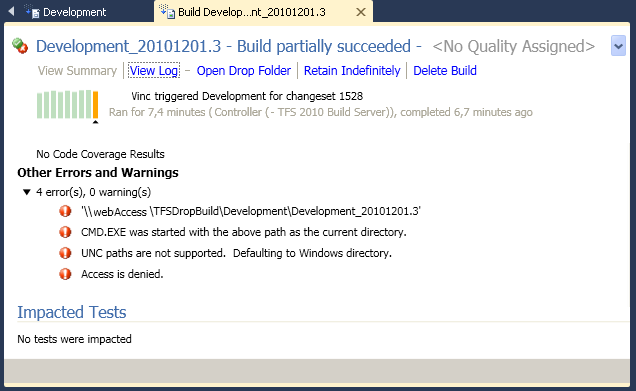
If you made an error, here is an example of a Build compilation problem (UNC=universal naming convention):
  • CMD.EXE was started with the above path as the current directory.
  • UNC paths are not supported.  Defaulting to Windows directory.
  • Access is denied.


Else, it's done and finished !!

In the resulting XAML, we can notice that Visual Basic is NOT dead :


              <If Condition="[AssociateChangesetsAndWorkItems]"
DisplayName="If AssociateChangesetsAndWorkItems"
sap:VirtualizedContainerService.HintSize="464,477"
mtbwt:BuildTrackingParticipant.Importance="Low">
                <If.Then>
                  <mtbwa:InvokeForReason
DisplayName="Associate Changesets and Work Items for non-Shelveset Builds"
sap:VirtualizedContainerService.HintSize="297,376"
Reason="Manual, IndividualCI, BatchedCI, Schedule, ScheduleForced, UserCreated">
                    <sap:WorkflowViewStateService.ViewState>
                      <scg:Dictionary x:TypeArguments="x:String, x:Object">
                        <x:Boolean x:Key="IsPinned">Truex:Boolean>
                      scg:Dictionary>
                    sap:WorkflowViewStateService.ViewState>
                    <mtbwa:AssociateChangesetsAndWorkItems
DisplayName="Associate Changesets and Work Items"
sap:VirtualizedContainerService.HintSize="234,22"
 Result="[associatedChangesets]" />
                    <mtbwa:InvokeProcess
DisplayName="Invoke DeployBatch"
FileName="E:\TFSDropBuild\testBatch.bat"
sap:VirtualizedContainerService.HintSize="234,190">
                      <mtbwa:InvokeProcess.ErrorDataReceived>
                        <ActivityAction x:TypeArguments="x:String">
                          <ActivityAction.Argument>
                            <DelegateInArgument x:TypeArguments="x:String" 
                            Name="errVTHOutput" />
                          ActivityAction.Argument>
                          <mtbwa:WriteBuildError
DisplayName="DeployBatch Error"
sap:VirtualizedContainerService.HintSize="200,22"
 Message="[errVTHOutput]" />
                        ActivityAction>
                      mtbwa:InvokeProcess.ErrorDataReceived>
                      <mtbwa:InvokeProcess.OutputDataReceived>
                        <ActivityAction x:TypeArguments="x:String">
                          <ActivityAction.Argument>
                            <DelegateInArgument x:TypeArguments="x:String" 
                            Name="stdVTHOutput" />
                          ActivityAction.Argument>
                          <mtbwa:WriteBuildMessage
DisplayName="DeployBatch Output"
sap:VirtualizedContainerService.HintSize="200,22"
Message="[stdVTHOutput]"
 mva:VisualBasic.Settings="Assembly references and imported namespaces serialized as XML namespaces" />
                        ActivityAction>
                      mtbwa:InvokeProcess.OutputDataReceived>
                      <sap:WorkflowViewStateService.ViewState>
                        <scg:Dictionary x:TypeArguments="x:String, x:Object">
                          <x:Boolean x:Key="IsPinned">Truex:Boolean>
                        scg:Dictionary>
                      sap:WorkflowViewStateService.ViewState>
                    mtbwa:InvokeProcess>
                  mtbwa:InvokeForReason>
                If.Then>
              If>


_