I organized the first Agile .Net France in Lyon, packed of people.
And the most warriors of us stayed up until 1 in the morning where we were talking about TDD!
Free drinks and special hotdogs to accompany our discussions.
Showing posts with label UnitTests. Show all posts
Showing posts with label UnitTests. Show all posts
Friday, July 26, 2013


Thursday, June 23, 2011
[ALM, Unit Tests, SpecFlow] Magically generate your Unit Tests from the Specifications !!
(Sorry not translated from my French Blog : http://blogs.codes-sources.com/thavo/. Google Translation will help you)
Ce serait le rêve de générer par magie ses tests unitaires à partir des specs avant même d’avoir écrit son_code ?
- A la fois on serait en TDD, qui est déjà un rêve pour une majorité d’entre nous. Vous avez déjà entendu d’un Directeur/Chef de projet “Oui, c’est super les TU… mais on n’a pas le budget, le temps, il y a plus prioritaire, etc…”
- A la fois nos TU pourraient être “écrits” par le “Business Analyst” ou Chef de projet, si c’était le cas.
BDD existe déjà depuis un bout de temps, mais je voulais parler d’un outil particulier que nous allons découvrir ci-dessous.
PS: Dans ce cas BDD pas comme “Base De Données”, mais comme Behaviour Development Driven).
Comment cela peut fonctionner dans une ALM TFS en mode Agile ??
1. Le Chef de projet ou Business Analyst écrit les specs dans TFS en tant que User Story. Voici un exemple : 

2. Toujours le Chef de projet ou Business Analyst écrit les scénarii de validation de tests d’acceptance afin de valider la User Story précédente.
Pour cela, écrit dans un fichier texte *.feature (compatible avec le standard Cucumber-Gherkin syntax) sous Visual Studio 2010 pour disposer de l’IntelliSense !!.
Pour cela, écrit dans un fichier texte *.feature (compatible avec le standard Cucumber-Gherkin syntax) sous Visual Studio 2010 pour disposer de l’IntelliSense !!.
PS1: il y aurait moyen de créer cela en tant que WorkItem puis générer ce fichier texte.
PS2: Pour faire le lien avec Scrum, on peut comparer cela à la “Definition Of Done”, qui doit être composé d’éléments mesurables, donc vérifiable (pas du genre… lorsque l’on clic sur le bouton “OK”, l’écran doit s’afficher rapidement).
PS2: Pour faire le lien avec Scrum, on peut comparer cela à la “Definition Of Done”, qui doit être composé d’éléments mesurables, donc vérifiable (pas du genre… lorsque l’on clic sur le bouton “OK”, l’écran doit s’afficher rapidement).

| 3. Ensuite, toute la magie intervient dès que l’on fait Ctrl-S pour “enregistrer” ce fichier. Cela génère près de 100 lignes de code de tests unitaires C# (de type MsTest, mais cela pourrait être aussi xUnit, NUnit, MbUnit). ”La magie” s’appelle SpecFlow !! |  |

4. Enfin, on peut compiler le tout et lancer les Tests Unitaires. Ne pas paniquer, si cela ne passe pas, puisque cela respecte bien le principe de TDD se basant sur le “RGR” (Red GreenRefactor). “Red”… enfin, techniquement, ci-dessous c’est Orange, car Inconclusive.

5. Comme c’est en “Red”, le développeur doit coder le code Business (ou bien le connecter ou bien injecter des objets existants) afin de le faire passer au Green. Pour cela, il suffit de copier / coller le code en bleu ci-dessous généré par TeamSpec (il y a probablement un autre moyen).
On colle cela dans un autre fichier; bon, pour faire passer au Green, j’ai mis partout des Assert True à titre d’exemple.
On colle cela dans un autre fichier; bon, pour faire passer au Green, j’ai mis partout des Assert True à titre d’exemple.
 |  |
Lorsque tout est Green, on connecte le tout à la TeamBuild TFS afin d’être certain qu’il n’y ait pas de régression à chaque Check-in (si Gated Check in), ou bien tous les soirs.
Ensuite, on “Refactor” la partie Business, voir ses TU afin de faire plus propre. Puis, le CDP réitère en rajoutant des nouvelles “Definition Of Done”, donc cas recasse et nous voila reparti pour le cycle Red Green Refactor.
Pour aller plus loin dans les tests : Utiliser SpecFlow avec Coded-UI de VS2010 :
https://github.com/techtalk/SpecFlow/wiki/Using-SpecFlow-with-CodedUI-API
https://github.com/techtalk/SpecFlow/wiki/Using-SpecFlow-with-CodedUI-API
PS: Suite à l’installation de SpecFlow, ne comptez pas sur l’aide fournie pour vous donner un coup de main, mais votre moteur de recherche préféré (car l’aide PDF est en mode Brouillon et pas complet) ==> Il faut rajouter au crproj de test une référence vers l’assembly SpecFlow et un fichier App.Config contenant les informations suivantes (MsTest, mais vous pouvez choisir les autres types).
Tuesday, November 16, 2010
First attempts with CodedUITests with Silverlight 4
In fact my really first attempt with Coded UI was in Dec 2009
http://memoprojects.blogspot.com/2009/12/silverlight-and-microsoft-test-and-lab.html, but, back then, I had a nice message "Microsoft Silverlight is not supported.. Test paused.".
On the 15th Nov 2010, Microsoft has released VS2010 Feature Pack 2, and I was waiting for a while for it. Now I tried it on our complex Silverlight 4 LOB Application.
1/ .... well, well, ... here is my first go :
We can record a new Coded UI Test for Silverlight :

However, no Silverlight controls were detected. "Verify that the application under test is built using Silverlight assemblies with a version 4.0 or greater and that a reference to the Microsoft.VisualStudio.TestTools.UITest.Extension.SilverlightUIAutomationHelper.dll assembly has been added to the project".

So you'll have to read http://msdn.microsoft.com/en-us/library/gg413374.aspx
and add the missing DLL : Microsoft.VisualStudio.TestTools.UITest.Extension.SilverlightUIAutomationHelper.dll
I was just used to use HP QTP to perform the tests, for which it requires no modification of our application (i.e. no need to add any additional DLLs on our projet - that you have to use a switch mechanism so that they are not released in the production environment ! ).
If you don't add the extra MS DLLs, your Coded UI Test Builder will be empty, even if you click like crazy on your Silverlight application :

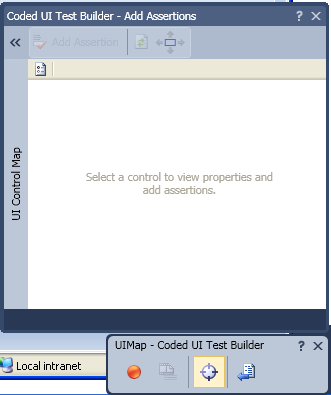
After having inserted the DLL on ALL our composite view projects (because of MVVM et PRISM), I ran it again... but still the same problem. Then, I tried to add the DLL only to one project : Still not working.
==> I'll have to try it on a tiny project first.
==> I'll have to try it on a tiny project first.
2/ My second try was on a small Business project :
Seams to work fine and to record... up until the point when I click on "Generate Code"
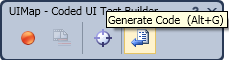
"cannot generate code because you are in debug mode" !!
3/ Let's try again !
Yes it works... but only on a small project, and with few crashes...

4/ Conclusion of my first 'go'
Whereas my first trial of TELERIK WebUI Test Studio with Silverlight was fully satisfactory (with a large Silverlight project with MVVM and PRISM patterns),
my first go with MS Coded UI with Silverlight was a bit disappointing even if it offers more integration with the TFS Software factory.

First crash : The Coded UI Test Builder requires me to use a 100% Zoom scale for my IE browser. Else, you'll have this warning "Windows Enternet Explorer zoom setting must be set to 100%. Please change the value to 100% and try again.",

Once back to 100%, this crashes Coded UI !!

Restart again, then the recording FINALLY works !!
However, I never managed to record again (even after a reboot).
Enough for today ! I'll try again another day... hence back to TELERIK WebUI Test Studio et HP QuickTestPro (that requires no additional DLLs on our project to make it work) ;-)
Note : I tried coded UI on the Windows calculator (calc.exe) : no problems. Then I started to use it for "a real need", such as with "SQL Server Management Studio" within wizzard to generate T-SQL Scripts. It works nearly properly : No errors during the recording, but a mini problems do not allow me to use it to "Run" afterwards. Indeed, it stops the playback when dealing with some Drop Down List (although with some DDLst on other windows it works).
Tuesday, August 31, 2010
Tuesday, December 1, 2009
Silverlight and Microsoft Test and Lab Manager (Visual Studio 2010 Beta 2)
Hi, I am currently using "Test Runner" from "Test and Lab Manager" (Visual Studio 2010 Beta 2) for a Silverlight 4.0 project. As soon as I start recording, I have a spendid error message :
"Microsoft Silverlight is not supported.. Test paused."
Any one knows if it's going to be supported on Visual Studio 2010 RTM ??
[updates: Dec 2009] :
I tried a very powerfull and impressive UI Automation that works on a Silverlight 4.0 projects.
It is the WebUI Test Studio 2 application from Telerik / ArtOfTest.
They claim to be this first "Record and Play" for Silverlight (even Microsoft hasn't supported it ... yet ! == It'll come soon after the release of VS2010 RTM).
Here is the article : Telerik and ArtOfTest Launch Industry’s First Record & Play Silverlight UI Testing Automation Solution.
Even more impressive, I installed it on my VS2008 (even if the SL4 project was developped in VS2010b2), and it worked straight after, and is very intuitive (but a bit slow since I was in a VPC).
Another UI test for SL (but I haven't tried yet): Hewlett Packard has launched a plugin to HP QTP (QuickTest Pro).
[updates: Dec 2010] : Our Quality Team tried HP QTP to create the automated UI testing on our complex SL4 LOB application. This tool is really expensive, but it works perfectly within half a day, and no need to reference within our project any additional DLLs (which is the case for WebUI Tests Studio from Telerik or the Microsoft Coded UI).
Vincent THAVONEKHAM
Subscribe to:
Posts (Atom)