Tuesday, November 30, 2010

How to manage Build increments with TFS 2010

Is it given by default in TFS 2010 ?
Yes according to this Blog.
http://freetodev.wordpress.com/2009/11/07/versioning-code-in-tfs-revised/

Else, you could use MSBuild 4.0 to do so :
http://www.wintellect.com/CS/blogs/jrobbins/archive/2009/11/09/tfs-2010-build-number-and-assembly-file-versions-completely-in-sync-with-only-msbuild-4-0.aspx

Or, here is a GREAT example to extend the workflow floundation :
 "Version Assemblies with TFS 2010 Continuous Integration", using Custom Workflow Activity :
http://geekswithblogs.net/michelotti/archive/2010/05/15/version-assemblies-with-tfs-2010-continuous-integration.aspx

In all cases, a good idea is to rely on CodePlex, such as an MSBuild Extension to ease your life:
http://www.msbuildextensionpack.com/

As a general guidance (Jim LambProgram Manager for Team Foundation Server - build automation features) :


·         If the task requires knowledge of specific build inputs or outputs, use MSBuild
·         If the task is something you need to happen when you build in Visual Studio, use MSBuild
·         If the task is something you only need to happen when you build on the build server, use WF unless it requires knowledge of specifi build inputs/outputs
When using MSBuild, remember that you can customize your project files directly (by unloading them and then editing them in Visual Studio), or you can create custom .targets files and import them into your individual projects. The latter approach is useful for functionality that's common to multiple projects to avoid maintaining multiple copies.
When using WF, remember that you can write code activities for low-level tasks but that you can also compose higher-level tasks using straight XAML. We're actually working on a version of the default build process template that shipped with TFS 2010 that gives you a simpler, less granular view of the overall process by using a set of composed XAML activities.


Monday, November 29, 2010

Don't forget the HotFixes, FeaturePacks, QuickFixEngineering (QFE), PowerTools, ...

(update: see http://memoprojects.blogspot.com/2010/12/alm-tfs-2010-vs-2010-where-to-start.html for up to date versions given in the comments)
To properly work with VS2010 and TFS 2010, it is important to install, at least, the following :


  •  VS10-KB2403277-x86-Prerequisit-FeaturePack-2-for-VS2010.exe
    è   Pre-requisite for Microsoft Visual Studio 2010 Feature Pack 2,
    è https://connect.microsoft.com/VisualStudio/Downloads/DownloadDetails.aspx?DownloadID=32400&wa=wsignin1.0 
  • en_visual_studio_2010_fp2_x86_604352-FeaturePack2-14nov2010.msi
    è From the MSDN subscription website
  • VS10-KB2251084-x86 Cut or Copy displays 'insufficient memory' error.exe
  • VS10-KB2268081-x86-Find and Replace Dialog Growing.exe
  • VS10-KB2345133-x86-FixScrollingContextMenu.exe
  • tfpt-TFS-PowerTools-Sept2010.msi


 And why not :

  •  en_visual_studio_2010_pex_0.94.51023.0_power_tools_x64_598803.exe or
    en_visual_studio_2010_pex_0.94.51023.0_power_tools_x86_598803.exe

37 Case Study on TFS 2010 !!

Ever wanted to find out who is using TFS 2010, and in which context ??

Here's how : http://www.microsoft.com/casestudies/Case_Study_Search_Results.aspx?Type=1&Keywords="Team%20Foundation%20Server%202010"


Tuesday, November 16, 2010

First attempts with CodedUITests with Silverlight 4

In fact my really first attempt with Coded UI was in Dec 2009
http://memoprojects.blogspot.com/2009/12/silverlight-and-microsoft-test-and-lab.html, but, back then, I had  a nice message "Microsoft Silverlight is not supported.. Test paused.".


On the 15th Nov 2010, Microsoft has released VS2010 Feature Pack 2, and I was waiting for a while for it. Now I tried it on our complex Silverlight 4 LOB Application.

1/ .... well, well,  ... here is my first go :
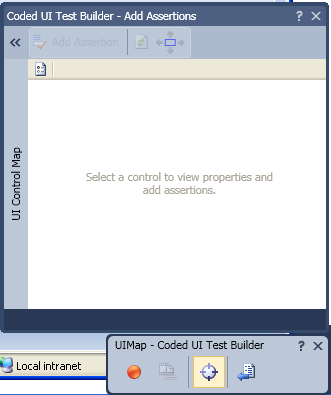
We can record a new Coded UI Test for Silverlight :

However, no Silverlight controls were detected. "Verify that the application under test is built using Silverlight assemblies with a version 4.0 or greater and that a reference to the Microsoft.VisualStudio.TestTools.UITest.Extension.SilverlightUIAutomationHelper.dll assembly has been added to the project".

and add the missing DLL : Microsoft.VisualStudio.TestTools.UITest.Extension.SilverlightUIAutomationHelper.dll

I was just used to use HP QTP to perform the tests, for which it requires no modification of our application (i.e. no need to add any additional DLLs on our projet - that you have to use a switch mechanism so that they are not released in the production environment ! ).

If you don't add the extra MS DLLs, your Coded UI Test Builder will be empty, even if you click like crazy on your Silverlight application :
After having inserted the DLL on ALL our composite view projects (because of MVVM et PRISM), I ran it again... but still the same problem. Then, I tried to add the DLL only to one project : Still not working.
==> I'll have to try it on a tiny project first.

2/ My second try was on a small Business project :
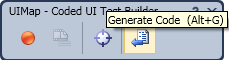
Seams to work fine and to record... up until the point when I click on "Generate Code"
At that point, my Visual Studio was in debug mode, and I had the nice popup :
"cannot generate code because you are in debug mode" !!

3/ Let's try again !
 Yes it works... but only on a small project, and with few crashes...


4/ Conclusion of my first 'go'
Whereas my first trial of TELERIK WebUI Test Studio with Silverlight was fully satisfactory (with a large Silverlight project with MVVM and PRISM patterns),
my first go with MS Coded UI with Silverlight was a bit disappointing even if it offers more integration with the TFS Software factory.

5/ My second trial : Remove all references to the DLL, excet for 1 project in our MVVM PRISM4 project (i.e. I can record only one screen)

First crash : The Coded UI Test Builder requires me to use a 100% Zoom scale for my IE browser. Else, you'll have this warning "Windows Enternet Explorer zoom setting must be set to 100%. Please change the value to 100% and try again.",


Once back to 100%, this crashes Coded UI !!


Restart again, then the recording FINALLY works !!
However, I never managed to record again (even after a reboot).

Enough for today ! I'll try again another day... hence back to TELERIK WebUI Test Studio et HP QuickTestPro (that requires no additional DLLs on our project to make it work) ;-)

Note : I tried coded UI on the Windows calculator (calc.exe) : no problems. Then I started to use it for "a real need", such as with "SQL Server Management Studio" within wizzard to generate T-SQL Scripts. It works nearly properly : No errors during the recording, but a mini problems do not allow me to use it to "Run" afterwards. Indeed, it stops the playback when dealing with some Drop Down List (although with some DDLst on other windows it works).

Monday, October 18, 2010

Bug in Silverlight 4 : HtmlPage.PopupWindow cannot resize poup

When trying to open a resizable popup window throught Silverlight, don't try to find out why it doesn't work with IE in some cases, works with FF in some others, etc... don't waste your time, simply because HtmlPage.PopupWindow is flawed.

Indeed, this sounds silly, but  because of a spelling mistake that is around for at least a year, and Microsoft is aware of that.

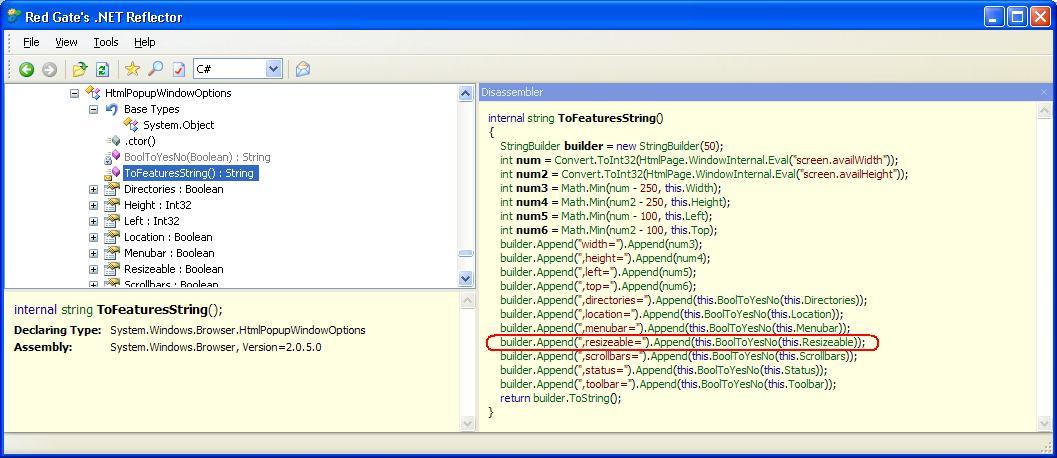
Take a look at Reflector :

The bit of code appends an invalid JavaScript command ("resizeable" instead of "resizable").

How to solve it ? ... wait for a patch..., or use the good old JavaScript, for example :

string javascriptOpenWindow = "window.open('" + link + "','MyWindow','toolbar=no,location=no,directories=no,status=yes,menubar=no,scrollbars=1,resizable=1,width=1024,height=800,left=20,top=20')";
               
System.Windows.Browser.HtmlPage.Window.Eval(javascriptOpenWindow);


How Genetic Algorithm can ease your User Test cases (UI Tests)

 Let consider a large application to develop; it is not possible to list the entire exhaustive combination of User Test Cases : You could have millions of possible ways of using your complex application, hence millions of User Test Cases to record and run within the automated Software Factory.

When dealing with large and complex scenarios, Genetic Algorithms are good to find a solution quickly, whereas calculating all possible ways would last more than decades even with the fastest computer.

Let us assume that the red biomorph fractal below is THE best User Test Case that you are looking for, because it covers 100% of the needs (hence you don't have to tests all possible combinations, where many of them would likely to do nearly the same thing), and would guarantee no software regressions over years.

Since you don't know yet the solution, you would try to identify programmatically for exemple 1000 random combinations (24 of them are represented as white biomorph fractals below).
By letting them evolve throw a reproduction process (with various factors such as mutations) during a large number of iterations, this would lead to find a solution within minutes.
This may be not the perfect one, but the closest to the sought solution.
  

"Genetic Algorithm Viewer 1.0", by Jean-Philippe Rennard, is the software above that can demo the principles, based on biomorph fractals : http://www.rennard.org/alife/french/gavintr.html.

This post only shows an example of what could be done; it is up to you to either implement or buy a software that will help you implementing ONLY relevant User Test Cases (hence the minimum required tests), and not a large number of combinations anymore.

Some other links on AI or GA :
http://dotnetkicks.com/csharp/How_to_Create_a_Neural_Network_and_Genetic_Algorithm_in_C_NET
http://www.codeguru.com/Cpp/misc/misc/article.php/c3795
http://www.codeguru.com/cpp/cpp/algorithms/general/article.php/c14825