Friday, February 17, 2012

[Azure] Migrating your SQL Server 2008 Database to SQL Azure

They are many ways you could do to migrate your SQL Server 2008 database (SSIS bulk copy, Data Sync, dedicated tools, …). Here is one of them, that was quite painless, and free of charge (at opposed of using commercial tools).
Because the Windows Azure world is moving really fast, this method might be already out of date as you are reading !

Pre-requisites:
How-to?
  1. Let us assume you have VS 2010 and SQL Server 2008 R2, and you have an existing DB that you are happy with,
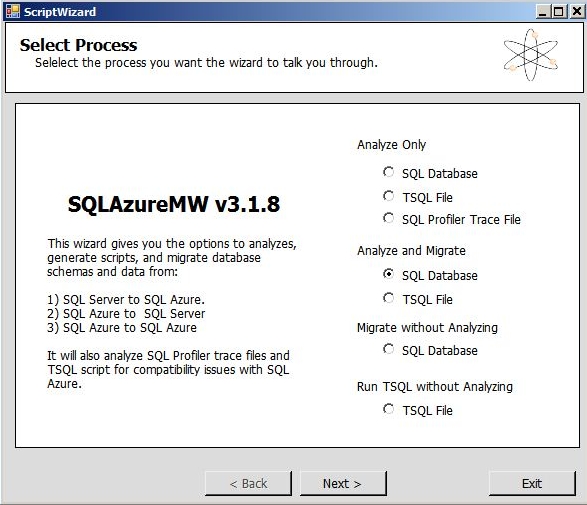
  2. Install and use “SQL Azure Migration Wizard” tool to connect to your existing database. It will generate you as T-SQL Script will errors that would occur in SQL Azure (you could find all the infringement rules alongside this CodePlex project),
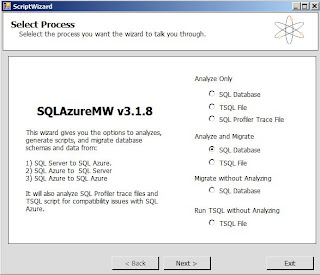
  3. Modify your T-SQL accordingly to fix highlighted errors and generate a new database. Let call it DB_SQL_AZURE_COMPLIANT,
  4. Migration DONE !! (either let the tool correct for you or do it your self). This tool could even push your database (without its data) directly into SQL Azure.
    The steps after are to enable you to work in a secure manner and ensure your project is still compatible with SQL Azure, and provide a link to show how to also push your data (using BACPAC),

  5. With VS 2010, create (or use an existing) a SQL Server Data-tier Application image
  6. Reverse Engineer you SQL database into Visual Studio Database DAC project using "Import Data-tier Application...", and connect to your new DB_SQL_AZURE_COMPLIANT database
    image
  7. You will have a VS 2010 DB project that is able to generate DACPAC v2.0 deployment file (basically, it is a ZIP file that contains schema of you database, without any data. As opposed to BACPAC that is a extension of DACPAC, where a BACPAC also contains you data as JSON format). More info on DACPAC format: http://msdn.microsoft.com/en-us/library/ff719373.aspx
  8. Now you have a DB project that is most likely be able to be deployed into SQL Azure (you can be certain only once you have migrated everything). You could verify that by running again the “SQL Azure Migration Wizard” tool and deploy into SQL Azure. You now should have no errors.
  9. To double check it is really compliant, we are going to use our VM,
  10. Mount your VM and configure your network card (so you could access it vis MSTSC)
  11. Make a Snap shot of your VM (in case you want to rollback)
  12. Copy/Paste you DAC project (created with VS2010) into the VM and open it with VS11, and confirm the you want your project to be migrated into a VS11 DB project,
  13. Because you’ve done a great job correcting the T-SQL Errors, and you have great Stored procedures, views, … and no errors, you could activate ALL rules CodeAnalysis (below) with confidence !!
    Also, ensure you have a Data-tier Application (.dacpac file) checkbox is selected, and that the “Target platform” is “SQL Azure”.
    image
  14. Install Silverlight 5 add on the VM. This is because the existing one on the VM is old and will not support new SQL Azure web portal
    (generally, unless you know what you do, do not install SL5 on your DEV machine if you are working on SL4, else you would spend hours uninstalling. Indeed, it will break your SL4 dev environment)
  15. Connect to your Windows Azure web portal, and go to “Database” (this is in Silverlight 4)
    image
  16. Click “Manage” this will open the Web portal to manage SQL Azure
    image
  17. The opens a new Web portal to manage SQL Azure (in Silverlight 5)
  18. Now you could play with your newly database migrated into SQL Azure (type in plain T-SQL and run it). This web portal contains MANY MANY MANY great functionalities that you should discover ONLY progressively (because it looks nice, but a bit messy !!)
  19. The final step is to populate your database with data (simply use a T-SQL script as a quick hack). Indeed, again DACPAC only deals with schema and for data, this is done using BACPAC: http://www.4tecture.ch/blog/sql-azure-import-export-service-is-now-in-production
    But this is another story, based on other Windows Azure platform components and further CodePlex projects ! 
By the way, with a large database, I never managed to make the Microsoft “SQL Azure Compatibility Assessment” tool working. http://www.microsoft.com/en-us/sqlazurelabs/labs/sqlassessment.aspx.It seams really promising, but it always tells me that my DACPAC is of an incorrect format, and that I should use a SQL Server Data Tools (CTP4) to generate it.
But how come ?? unless my version of SQL Server Data Tools installed in my VS11 is out of date ! In which case, I must again run after the latest tool and latest news concerning Windows Azure.

Tuesday, November 8, 2011

[TFS11 & VS11] NDepend to reverse Engineer Microsoft Fabrikam Fiber

1. Introduction
In order to practice our skills with the latest version of TFS 11 and VS 11, I decided to reverse engineer rapidly the standard Microsoft Fabrikam Fiber project.
Because I am a big fan of NDepend (often used as quality and technical audit tool), I will use this tool to understand more about Fabrikam Fiber project.

Usually, I use NDepend along a Software Factory as a quality gate on the top of FxCop and StyleCop (Vincent Labatut has got a CodePlex project to integrate easily NDepend to TFS 2010's Build definition).

2. Presentation of Fabrikam Fiber
In the context of TFS 11 and VS 11 usage, Fabrikam Fiber is a Microsoft Web Project that to be a pseudo real case projec. As such it allows us to understand new concepts and practice ALM 11 tutorials. The source code is split accross 3 branches in TFS 11 : Main / Dev / Release1
 

image

image


3. How is it organized ?
It's where NDepend comes into play. It will help us not only reverse engineer quickly the solution, but it will also present Microsoft's Best Practices coding conventions.

To enable NDepend analysing your VS11 Solution just edit the version inside the *.SLN:
image

image

3.1 Overview of the solution

You'll be able to zoom in / out with NDepend, as well as move or edit the Dependency Graph below:
 DependencyGraphSnapshot

3.2 Investigating on specific elements
Moving the mouse over the main web project FabrikamFiber.Web,

image

tells us with a color coded conventions how many DLLs this projects are connected to.

In the same time, it also presents a property window with loads of information (on the right). Moving the mouse to another assembly will dynamically change those info.


The test project (below) is using NUnit framework with mocking. Which means, we will be able to play with the new VS 11 to use many type of tests (and not only MSTests).
image
image

Let’s have a look at the NUnit tests. To do so, I can use another view called “Dependency Matrix”, where I can see that there’s 2 members coupled between nunit.framework and the test project:

image Then, I can drill down to have more details, and get another Dependency Diagram that explains me the various relationships.

And finally drill down to the source code.

4. Code Quality of the source code
Out of the 82 Code Metrix provided by default, I am presenting you one of them  below. It concerns performance issue of type “Boxing/unboxing methods that should be avoided” (you could create as many metrics as you want to suit your needs, using CQL language). It shows potentially 27 Performance issues.

image

  • Pan (1) : The CQL query along with some advices
  • Pan (2) : Where this query is classified into the SQL Query Explorer (you could create your own entry)
  • Pan (3) : The number of quality infringements that satisfies the query
  • Pan (4) : The 27 quality infringements are graphically filled in blue. The entire fractal representing your entire solution (decomposed graphically into Assemblies, namespace, … and methods). On mouse over the blue rectangles, you have more details.
  • Pan (5) : The 27 quality infringements  listed
  • Pan (6) : Details property

5. HTML report
Here is an overview of the HTML report. Similarly to the “heavy” client, those reports are filled with plenty of help you understand various quality concepts.

image

I don’t know why, but the HTML report is the only way to visualize an interesting diagram “Abscractness versus Instability”.
image

This graph places all your assemblies into coloured zones and along 2 axis. From my experience, anything that does not fal into the green circled area should be considered as a pain to maintain. If an assembly falls into a red zone, you should fire the developer straight away !

Which mean this code’s implementation seams good from this diagram. Then we should double check with other indicators.

Since it is unfortunately a static PNG image, in large projects all assemblies are superimposed in the circled zone. Hence it becomes hard / impossible to read. As a result, I just use this graph as a trend indicator. Assembly in Orange or Red zone should be seldom, therefore you’ll be able to read its name.


Now I got a better idea of what this project is about, I can deep dive into the source code, and coming back and forth to NDepend, then drill down to the code again.

Monday, October 24, 2011

[SQL Azure] Overview of tools for using SQL Azure {plenty of Silverlight Line Of Business}

image

This post is about presenting rapidly tools for creating and managing SQL Azure.

image

I am delighted to see how much effort Microsoft put into Silverlight LOB tools {cf. Silverlight is not dead}.

has invested a lot of effort into those tools. put into their tools for managing their Windows AZURE platform.

STEP 1. First of all let`s login to the Windows AZURE platform Web portal: https://windows.azure.com/

image

The entire interface is a Silverlight LOB application to manage a large amount of information and management operations  {notice that HTML has not been forgotten and identified in Green above when resizable Rich Text is required. See note at the end}.

STEP 2. Go to Database Tab and instantiate a new SQL AZURE server, and choose one of the 6 Datacenter the MS `offers` you:


image


image

  • North Central US – Chicago, Illinois
  • South Central US – San Antonio, Texas
  • North Europe – Amsterdam, Netherlands,
  • West Europe – Dublin, Ireland
  • East Asia – Hong Kong
  • Southeast Asia – Singapore
  • If you are concerned with data regulation when storing your database somewhere in the Cloud, here is a list of the countries and cities` location.

    STEP 3. Create a database with Admin accounts. In this example, I just create a small database {1 GB max}.

    image

    STEP 4. Administering tool. To administer your database, use another SaaS tool  provided by Microsoft: SQL Azure Management Portal.

    Knowing that dhaigdshn8 is the name of my server, the address to administer it is located here: https://dhaigdshn8.database.windows.net

    It is again a Silverlight LOB application:

    image

    Once logged in, you have here is the home page:

    image

    Create any databases that is required
    image

    STEP 5. Administer your database {Create tables, views, stored procedures, run commands…}. Notice the nice “Office ribbon”
    image

    STEP 6. Use your database.

    Once setup, just use tools such as

    . SQL Server Management Studio
    . or Visual Studio {here under VS 2011}

    image

    image image

    STEP 7. That`s all, just enjoy your cloud database create in few seconds. How long would it take if you would have asked you IT service to create such database in production environment ? Winking smile

    =================

    NOTE 1: For information, you could apply to be part of Beta Programs on AZURE as shown:

    image

    NOTE 2: We can notice that MS used the Blob storage to store html pages {just change fr by en for English version}.
    https://azureportalprod.blob.core.windows.net/dashboard-fr/commontasks.html

    image

    Saturday, October 15, 2011

    Free Load test on AZURE to test the scalability of your Website

    When seeking for information on AZURE, I found out another free tool on its basic version for testing Web scalability: CloudNetCare

    However, if you want to test Silverlight applications, I suspect that he may need to combine other tools such as Selenium Silverlight {see below} and customize Scripts.

    Super quick and easy to configure, it has a double feature:

    · It is based on AZURE to increase its ability to inject load,

    · It creates not HTTP requests to simulate the load {Virtual Users}, but with the ability to scale-out on Azure, it instantiates many and true web browsers.

    image


    image

    As it`s quite tedious to copy / paste many URLs, which does not allow to simulate some GUI behaviors, an interesting variation is based on Selenium Scripts that are recorded via the GUI of Firefox.


    Note that there are many helps and videos, that are hidden by default, to accompany us all along the process.

    Then, a very `cloud ` approach when setting up the tests is to choose for example the DataCenter that will be used, and at what time you want to start the load.

    image

    then the characteristics of the tests: 

    image

    `Pour un test de plus de 100 utilisateurs… = `For a test that has got more than 100 users…`
    =>
    Since the purpose of such application is to load up until the maximum limit for your Web servers and determine the breaking point, CloudNetCare includes a protection:

    As a result and unfortunately you will not be not possible to assign 5000 servers in the cloud and break down your favorite e-Commerce web site and thus be on the front page of every newspapers.

    image

    Finally, you can share the results either by CSV export, or by creating a Web link. Here is a link to my test report {well, I just changed the GUID of my real one}:  http://www.cloudnetcare.com/WF_ShareResult.aspx?id=7fc52303d17f465e8dc7195502c3238c&Language=FR .

    image

    image 

    Really interesting concept, and big thank you CloudNetCare to have given us the ability to use free of charge the basic version.

    The only problem with the public cloud, it that it is more difficult to test my Intranet applications... I cannot complain, I cannot have everything ... free and as easily. Anyway, I am gladly adding this tool my ALM item list to make life easier and more agile.

    So have a good Agility, and a great Scrum hopefully.

    Technorati Tags:

    Saturday, October 1, 2011

    Alleluia !! a Load Test tool for Silverlight 4 that gives results within 5 min ! {download, install and running the tests included}

    After many searches, having read many people complaining about Load testing a Silverlight applications, watching nice demo of "Hello World" cases, installed commercial tools {but was stuck at some configuration points. See the notes at the end where I listed some of my tests}, and I finally …. gave up tonight !!


    But thanks to a final search on Fiddler2 fields {because it gave me the most promising results}, I came across stresstimulus tool. So sorry for those of you who already know this free Fiddler add-on, and also may be its limitations {in which case, please tell us your view points}.

    For the purists, I don't want to test Silverlight UI as such {i.e. for this type of test, I am not interested in Visual Studio 2010 Coded UI}, since it runs Client-side. Rather, I wanted to validate that, once deployed into production, this RIA will not put our IIS servers down. Hence, I want to simulate the load on Server-side, by generating lots of various calls to our web services easily.

    For my first trial of this tools, I chose a complex Line Of Business application
    { Disclaimer for those who recognizes this application /!\ I just did it gently so that I do not break it}.

    image


    Within the next 5 min I got the detailed results !! I could have nearly cried so much it was easy and … cheap !! {I am moving to the Pro version since I checked that it works fine on our real application, even with STS WIF and WCF binary activated !! which seams to be so difficult to handle for other tools}.


    image


    Here are some results
    Performance Graphs: Number of simultaneous users, request per seconds, Average response time, Bytes received per seconds, Errors per seconds.image


    A summary page
    Test Summary
    Test Case Summary
    File Name: Thavonekham-Tests.ssconfig
    Primary Pages: 2
    URLs : 39

    Test Parameters
    Think time between base pages:
    As recorded

    Iteration timing: Think time between iterations - 2s
    Load pattern: Constant load
    Users: 5
    Browser Type: IE8
    Network Type: Dial-Up 56k
    Complete test after: 5 iterations
    Warm-up time: 0 seconds
    Test Run Information
    Date: Oct-1 2011
    Start Time: 21:46:34.19
    End Time: 21:48:00.11
    Warm-up (s): 0
    Aggregate Session time (s): 851.53
    Test run duration (s): 85.92

    Overall Result
    Status: Completed
    Max User Load: 5
    Total bytes sent: 138,960
    Total bytes received: 41,191,492
    Bytes sent/sec: 1,617.292
    Bytes received/sec: 479,409.064
    Errors
    Http Errors: 0
    Total Timeouts: 0
    Page Timeouts: 0
    Missed Goals: 0
    Test Iterations
    Iterations Started: 5
    Iterations Completed: 5
    Avg. iteration time (s): 78.76
    Requests (HTTP transactions)
    Total requests: 195
    Requests/sec: 2.27
    Avg. response time (s): 4.37


    Page detailed {in terms of *.aspx for instance}: 
    image


    Request details {including resources such as xaml, png, xap, svc, …}
    image

    And finally
    Iteration Details
    image


    And it does really stress my Windows 8 computer ! {I only ran the test below for 30 seconds}
    image_thumb1

    At least one limitation: The generated reports do not track down to a specific WebMethod…. except on the example above. Indeed, the calls to WebMethods were passed within the Query String.


    Monitoring the load on the Database:
    As a complementary tool, use Microsoft SQL Server Profiler {in profiling mode, with a filter set to the name of your database to filter out unwanted SQL queries}. When you play back your tests with StresStimulus, it does call my Web services WCF bin and generated large amount of hits on the database. Now, just spot your top slower queries, and here you go ! Optionally, you could save your trace and run SQL Tuning Advisor.


    HOWEVER it is NOT a win yet, I have to try on our real life project. Indeed, I love Silverlight it is just a great RIA, but I also I apply even more the proverb “A bird in the hand is worth two in the bush”.
    Finally, it seams that with Silverlight we are left behind within the .Net world {eg. Unit Testing, CodeCoverage, proper ALM, …}


    If you find better tools, please let me know.


    TIPS / IDEAS / Alternative solutions for testing SL apps|

    NB : If you want to know what other tools I tried "{ Deviland start to feel the pain I went through}  see below:

    Re: Load Testing vis Silverlight Client?
    1 hour, 16 minutes ago | LINK
    Hi,
    I also struggled finding a proper load testing tool for Silverlight 4 {I know plenty of smart people would claim that there is no need to test RIA, but I want to test the WCF that my SL is using} :
    Plenty of "Hello World" nice and sunny video, ... but the reality is so different.
    1> Despite the fact I was using VS 2010 ultimate, it seams not to work "out of the box" for SL ! {despite its price}
    2> I successfully used Fiddler2 {free of charge} to record aspx calls, and most importantly the binary WCF calls { svc}. Fiddler2 offers the surprising ability to "SAVE AS VISUAL STUDIO WEB TEST"
    [Visual Studio WebTest http://www.fiddler2.com/fiddler/help/WebTest.asp].
    The only problem I had is that VS 2010 did not understand the binary messages that was recorded ! Damned !! I guess I unfortunately have to add an plain text endpoint. That was my most promising experience in Load testing with SL.
    3> Otherwise you can find at least 2 CodePlex projects {http://wcfloadtest.codeplex.com/ and http://teamtestplugins.codeplex.com/}.
    that seams to be OK, but they are not really maintained. My first go with those tools did not succeed all the way through. only partially.
    4> It seams HP Loadrunner 11 supports Silverlight 3 and 4 with WCF bin mode {but not advanced bindings, which is fine with me}.
    I will try that in the following months {just the time for me to sort out the license and first install}.
    5> Selenium Silverlight http://code.google.com/p/silverlight-selenium/updates/list and www.neotys.com
    If you are more lucky with EASY tools {i.e. I know my VS 2010 would work with plenty of cheats and "CodePlexes" }, please HEEELLLLPPPPP !!
    UPDATE > alleluia I just tried a Free {but with limited Virutal Users} add on to the great Fiddler2 beta.
    It is stresstimulus > Follow the link here http://memoprojects.blogspot.com/2011/10/alleluia-load-test-tool-for-silverlight.html.
    Vincent THAVONEKHAM.
    SL4LoadTest@thavo.com
    www.thavo.com