Monday, February 18, 2013

NDepends... or How to pass your code quality audit ?

If you belong to a large organization, when developing an application, you might have to go through a code quality audit, done by a third party company that has the power to say 'Go' or 'No go', and provide advices if not good.

As far as I am concerned, I appreciate it because it forces us to care even more about code Quality and maintainability (which includes security, performance, Design...). Maintainability is particularly important because once in production, the Dev team will hand-over their code to the Maintenance Team.

Because such audit consists in watching numerous aspects, it all brings me back to an old post of mine listing the number of rules that FxCop and StyleCop monitors. Where the various rules are grouped into  the following categories :

FxCop (or its variation integrated within Visual Studio called Code Analysis, or CA, that compiles your code then analyse it):
  • Design
  • Globalization
  • Interoperability
  • Maintainability
  • Mobility
  • Naming
  • Performance
  • Portability
  • Reliability
  • Security
  • Usage
StyleCop (or Source Analysis)
  • Documentation
  • Layout
  • Maintenability
  • Naming
  • Ordering
  • Readability
  • Spacing
It totals about 400 rules. After having enforced most of them on various projects, it can be noticed the following pattern:
  1. Developers find it painful to comply to containing rules, as opposed to "no rules" at all of "his own home-made rule",
  2. Since the developers DONT have to learn all 400 rules at before hand, but ONYL progressively, it is not too bad. Moreover, with the help of Resharper, this tool reformats tedious painful and repetitive work automatically (Resharper can connect to FxCop and StyleCop so that it changes your code accordingly)
  3. Because of the Software Factory preventing check-in in any code that is NOT compliant to the given rules (NOTE: You have to determine with your team, which rule are compulsory, and which ones are not), the developers HAVE to follow the rules,
  4. Finally, within few months of coding, a survey done in the teams I have been working with shows that developers got used to it,
  5. And last, it becomes irritating for them to read code that IS NOT compliant (just like reading a book with plenty of grammar and spelling mistakes).
 Now that you've reached step 5, what should you do about the external audit that has been enforced by your sponsors or the Quality Management team ?


It's where NDepends enters into play ! It's a software that I have been using for nearly 10 years, written by Patrick Smacchia (author of books and blog dedicated to .Net, C# and Code Quality).

As far as we are concerned, the auditor came in and has inspected meticulously all aspects of our projects technically (the audit consisting in evaluating our Agility/Scrum process was done by another company) :
  • all our source code,
  • our DLLs and PDBs
  • our web services
  • and architectural diagrams

One snapshot will not be sufficient, because it's only when you can play visually with your code through Drill-Down (up until the exact line of code) that you could understand its power.

Where to start ?
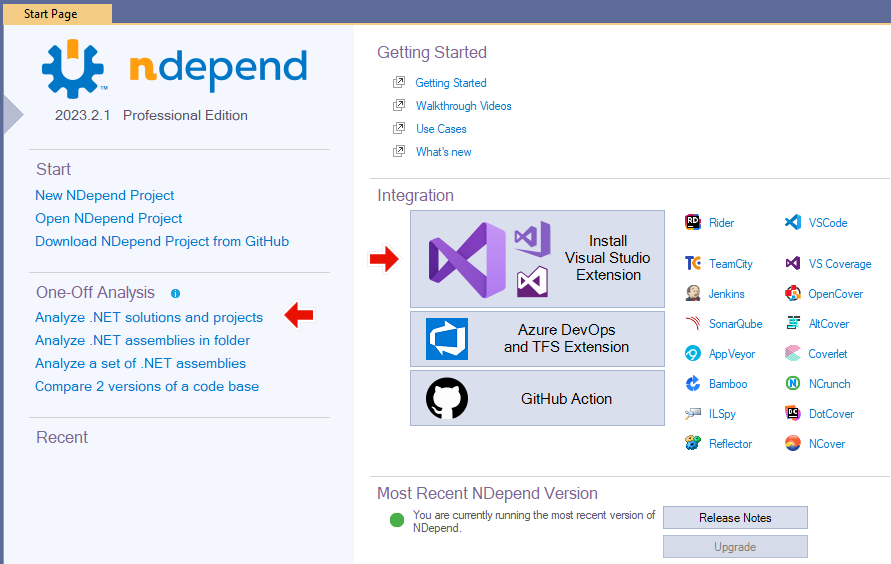
You have to "feed" NDepend with as much info as you can (*.Sln, *.csproj, DLLs, PDB, ...) in a Drag & Drop manner, then it could "answer" many of your technical questions concerning your projects.

Indeed, for me it considers your "project" (Source Code, PDB, DLLs, previous version of your source code, new code, ...) as a LARGE database, wich MANY different views (too much to fit in a single Snap shoot):


 where you could :
           Simple example:

from m in Application.Methods  
where m.NbLinesOfCode >  30  && m.IsPublic
select m


           More sophisticated sample:
// UI layer shouldn't use directly DB types
warnif count > 0


// UI layer is made of types in namespaces using a UI framework
        let
 uiTypes = Application.Namespaces.UsingAny(
                 
Assemblies.WithNameIn("PresentationFramework", "System.Windows",
                                       
"System.Windows.Forms", "System.Web")
              
).ChildTypes()

// You can easily customize this line to define what are DB types.
let dbTypes = ThirdParty.Assemblies.WithNameIn("System.Data",

"EntityFramework", "NHibernate").ChildTypes()
              
.Except(ThirdParty.Types.WithNameIn(
"DataSet"
, "DataTable", "DataRow"))

from
 uiType in uiTypes.UsingAny(dbTypes)
let dbTypesUsed = dbTypes.Intersect(uiType.TypesUsed)
select new { uiType, dbTypesUsed }


  • Identify through its build-in Quality rules (that extend considerably FxCop and StyleCop quality rules, or you could create your own ones)
        The list of the thousands of build-in rules is listed here.


  • Share a large amount of static results as a website, such as the one below that helps you find within seconds whether you have poorly designed components or not, and follow its evolution


  • Having a professional auditor in front of us, it took him only 1 day to decompose our work and start providing us feedback. Within this very same time, he managed to better understand part of our code than our developers ! To do so, he used many tools ... including one called ... NDepend !

    After having eliminated many "false positive" (since he does not know the context of our project), we managed to pass our audit with success and excellent grades !

    As per today, I am using the version 4.1.0.6871 (which incorporates a stand alone version as well as a VS 2010 and VS 2012 add on to play directly with your source code).
    Have a great audit !

    Monday, November 12, 2012

    Now you are Agile, what next ? Lets consider Transactional Analysis (French: Analyse Transactionnelle)


    I wanted to have a quick post on Transactional Analysis, which is a  psychology/psychotherapy discipline I heard about for years, 
    mainly influenced by Freud, but I never had the chance to investigate into. Well not until tonight.

    Scrum / Agile / XP ... has got some set of tools defined (daily stand up, iterations, scrum cards, ...). But those are only recipe. However, as opposed to traditional V-Cycle / Waterfall / PRINCE2, those basic tools are not enough to succeed in a project. What is required then is the soul and the conviction to improve yourself and the team ?

    Once you've also got the soul in place, to best achieve some improvements, you now have to 
    - analyse patterns of success using Scrum Patterns, or in fact more precisely patterns of failure so that you don't do them, or so that you identify them and get rid of them:  http://en.wikipedia.org/wiki/Scrum_pattern (definition that I have initiated by the way)
    - consider Dev’s team communication, but also the entire human interaction within the company.

    That’s where soft skills tools comes into play, where 2+2 is not necessarily 4, as opposed to computing (except in some cases geeks would say), but it only depends on many external parameters that we have to understand.

    Transactional Analysis as one of them, but let also mention Neuro linguistic programming (aka NLP, PNL in French), and a more “simplistic one” is the PCM©, Process Communication Management©)

    A French book that I would recommend, is “L’analyse Transactionnelle” René de Lassus © MARABOUT 1991, that I wish to quote 1 page (at the end), that is not meant to summarize the technique, but rather it means to me SOOOOO much in understanding my environment.

    It’s worth only 2,75€, so please get it from http://www.amazon.fr/Lanalyse-transactionnelle-Rene-De-Lassus/dp/2501027647 as I did, or anywhere else.

    Also consider having a look at PCM© as it is an even easier principle to understand, but as any soft skills, requires lots of practices and training.

    Obviously, even if you are not Agile, those techniques are also useful to understand hunain's interactions !!

    References:


    Thursday, August 2, 2012

    8Years-Study_Waterfall_vs_Agile

    I wanted to share you 1 slide: 
    Waterfall vs Agile project's success rate from 2002 to 2010

    No comments!

    Thursday, July 12, 2012

    Send email for free with Windows Azure


    From this documentation https://www.windowsazure.com/en-us/develop/net/how-to-guides/sendgrid-email-service/, here is a way to send emails for free provided it is less than 25,000 emails.
    image
    After some verifications from SendGrid that you are not a spammer, you will have access to the SaaS portal:
    image
    Configure your account in few steps, then everything is OK to send emails.
    image

    From your portal, you have access to the statistics
    image

    Emails that are Bounced, Blocked, Invalid, … are presented here:
    image
    As a .Net developer, simply add a Nuget into Visual Studio:
    SendGrid NuGet package
    Within your .Net code, simply use the information you filled in:
    image
    And here you go:
    // Create network credentials to access your SendGrid account.
    var username = "your_sendgrid_username";
    var pswd = "your_sendgrid_password";

    var credentials = new NetworkCredential(username, pswd);
    For more info: https://www.windowsazure.com/en-us/develop/net/how-to-guides/sendgrid-email-service/
    and http://sendgrid.com
    By the way, their Technical support is really quick to reply (less than an hour), based on the SaaS CRM: www.zendesk.com

    Thursday, June 7, 2012

    Evaluating Application Release Management tools combined with TFS ALM to deploy into Windows AZURE

    [Sorry, duplicated post. See original: http://memoprojects.blogspot.co.uk/2012/06/evaluating-application-release.html]

    Evaluating Application Release Management tools combined with TFS ALM


    This post aims to start a list (not exhaustive) of Application Release management tools that complements TFS for customizing and delivering complex deployment scenario on the Windows Azure platform.
    Here are some options InRelease, Nolio, attunity, UrbanCodeRightScale, New Relic,  Microsoft System Center (or more specific MS SC Orchestrator, previously called Opalis), Octopus, AttunityCodePlex TFS Deployer, MSBuild, MSDeploy, TFS ALM workflow (*) 
    (again, we could find a lot more).

    Update (July 2012): OpenSource Chef, from Opscode ==> VP of Product Management, George Moberly, demonstrates Chef's integration with Windows Azure at Microsoft TechEd Orlando 2012http://www.youtube.com/watch?v=il8lI7_FHP4

    [update] Other realease management tools listed here: http://www.lbms.cz/Reseni/Serena-Release-Manager/pdf/Serena-Ovum-rainbow-map-for-DevOps-solutions.pdf


    I have not assessed them all since it would take ages. However, I started to short list some of them according to our needs & priorities. If you are a vendor, please take a 5 to 10 min survey : http://fluidsurveys.com/surveys/intuitive/deploy-management-tool/
    To be fair with all short-listed vendors (I am open to any solution), I will provide them 2 or 3 pages of our needs so that they could convince us with a 1 hour customized demo.
    (*) TFS ALM used to deploy in Windows Azure. TechDays 2012 France Mise en place d'une démarche ALM avec Visual Studio pour Windows Azure (ALM206)
    ---------
    Claude Rémillard, the Product Owner of InRelease allowed me to publish his answers. It’s “row” data, so forgive the presentation:
    * Company website = inreleasesoftware.com
    * Product name = InRelease
    * User roles are usually supported by the tool:
        .Developer (in a Continuous integration environment)
        .QA for User Acceptance Tests
        .Release manager (approval)
        .Release engineer
        .Non-regression team (approval)
    * The application is "Agile" enough to deploy more than once a day
    * Support Windows / .Net code deployment
    * Requires the installation of an Agent on the targeted on-premise server
        . But Not needed for the Cloud
    * Automated provisioning for Microsoft Windows Azure Cloud
        . Possible, but not done out of the box. Complete support for Azure is on our roadmap.
    * Support DACPAC database deployment
    * Could trigger: Batch or PowerShell or Installshield
        . We support anything tool that can be triggered from a command line
    * Each deployment path (e.g. Dev / Integration / Demo_Version / Production) can be composed of re-usable sub-validation-blocks (e.g. path Dev = Dev+QA+STAGING+VALIDATION+PROD , and SalesDemo = Dev+QA+PROD)
    * Can be used as Standalone as well as triggered / integrated with TFS 2010
    * Has the ability to run in parallel processes
        . Currently, we have sequential steps per server, with parallel servers installation. In the coming months, we will support full sequential and parallel processes.
    TRACEABILITY
    * Ability to connect to a database for audit trail (who deployed, when, which path, validators...)
    * Can send emails to a mailing list
    * Can visualize workflow of deployment in real-time during deployment
    * Monitoring multiple simultaneous deployments ==> Partial. Can be done, but not all deployments are shown on one screen.
    * Can perform pre-deployment checks ? (e.g. sufficient disk space ?)
    * Can you capture and report on metrics (e.g. start-end time of each step of the process) ?
    * Can you block a deployment if not all approval has signed-off ?
    * Can schedule the deployments (date / time), with support restart of the deployment cycle, to recover from service interruption

    * Support on rollback ==> Current support for rollback is limited to redeploying the last version that was installed. Plans to support rollback (by providing a rollback step for each installation step) is planned for the coming months.
    * Possibility to centralize all configurations / variables (Web.Config, connection String, ...) ==> Different values per environment for variables are entered in InRelease. At deployment time, InRelease will then copy the values for a specific environment in the corresponding configuration file.
    * How are those configurations presented to us (eg. table per deployment path, XML file...) ==> In InRelease, in a table per application/environment.
    * How do centralize passwords (eg. SQL Server accounts, Service Accounts, Logins, ...) and restrict the access. In which container those passwords are stored (e.g. XML, database, ...) ==>     Password are entered directly in InRelease, encrypted as soon as they are entred, kept encrypted in the database, and only decrypted on the target server where the deployment is made.
    * One-time cost ==>    > $ 2001 (No recurring charge)
    * Size of the company     < 50
    * Number of customers     < 50
    * Why we should purchase your product ==> We are a company with a long ALM background and we are very close to our customers. Fast support, we listen to the needs of our customers and are constantly improving the software based on their feedback.
    * PS. I saw that you are located in Paris, do not hesitate to communicate with us en français if you prefer!

    Saturday, April 7, 2012

    More details on Windows Azure deployment lifecycle ??

    Beyond having this tiny window in Visual Studio 2010 (with Windows Azure SDK 1.6)
    image
    Anyone knows where we could get a detailed information on the Windows Azure deployment Lifecycle ??
    Indeed, we have nice articles, such as:
    http://msdn.microsoft.com/en-us/library/hh127476.aspx
    http://msdn.microsoft.com/en-us/library/gg433030.aspx
    but it there any diagram such as :

    image
    Note: In this example, the deployment time I provided are real, but based on a slow Internet connection (using a USB Dungle Internet)