1. This is where to start :
2. Customize your Build with Workflow Foundation 4.0
Based on the previous introduction, you'll be able to work with WF 4.0 on your Build process template (more than 600 lines of XAML).
2.a. Add a new Invoke Process after a successful Build, within the "Try Compile, Test, and Associate Changesets and WorkItems" activity, inside the "Compile, Test, and Associate" sequence :
2.b. Then, Drag & Drop an Invoke Process activity (from the Team Foundation Build Activities Toolbar), click property to set its parameters.
Warning 1: The previous MSDN documentation forgot to mention to add the
FileName parameter
inside double quotes, this bits of code will be considered as a String by WF4).
Warning 2: You will have a red exclamation mark above each new activity in error. This is NORMAL, since once you Drop them, they are not yet configured. A mouse over it will detail the problem.
2.c. Then, add 2 sub-tasks as 2 other activities within the Invoke Process : The WriteBuildMessage and the WriteBuildError. And set them up according to the previous MSDN example.
This is only a example where you could drop your 'Invoke process' activity. On 'real' project, you should combine this with If-Then conditions, and add it on anywhere is required. For this test, I placed this new activity at the begging of your workflow to see quickly of if works. Once OK, just Drag & Drop it to a relevant place.
Update : For more details, check my other post : Variables available for workflow foundation within TFS 2010
2.d. Once done, all the red exclamation marks will disapear.
2.e. Don't forget to archive this new Build ProcessTemplate, and reference it in the Build Definition (otherwise TFS will not find your changes that are only local).
2.f Option : You could add custom
C# from the TFS 2010 SDK code to extend further your process (
example here).
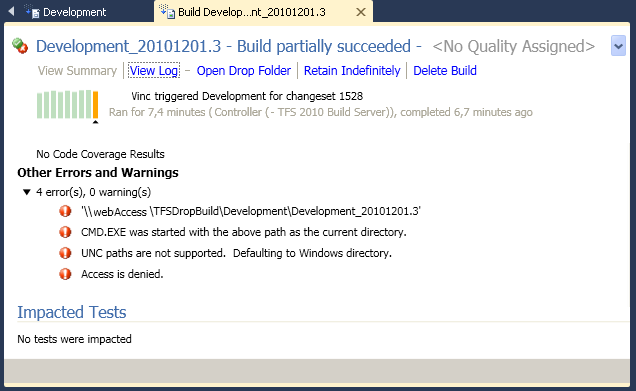
If you made an error, here is an example of a Build compilation problem (UNC=universal naming convention):
- CMD.EXE was started with the above path as the current directory.
- UNC paths are not supported. Defaulting to Windows directory.
- Access is denied.
Else, it's done and finished !!
In the resulting XAML, we can notice that
Visual Basic is NOT dead :
<If Condition="[AssociateChangesetsAndWorkItems]"
DisplayName="If AssociateChangesetsAndWorkItems"
sap:VirtualizedContainerService.HintSize="464,477"
mtbwt:BuildTrackingParticipant.Importance="Low">
<If.Then>
<mtbwa:InvokeForReason
DisplayName="Associate Changesets and Work Items for non-Shelveset Builds"
sap:VirtualizedContainerService.HintSize="297,376"
Reason="Manual, IndividualCI, BatchedCI, Schedule, ScheduleForced, UserCreated">
<sap:WorkflowViewStateService.ViewState>
<scg:Dictionary x:TypeArguments="x:String, x:Object">
<x:Boolean x:Key="IsPinned">Truex:Boolean>
scg:Dictionary>
sap:WorkflowViewStateService.ViewState>
<mtbwa:AssociateChangesetsAndWorkItems
DisplayName="Associate Changesets and Work Items"
sap:VirtualizedContainerService.HintSize="234,22"
Result="[associatedChangesets]" />
<mtbwa:InvokeProcess
DisplayName="Invoke DeployBatch"
FileName="E:\TFSDropBuild\testBatch.bat"
sap:VirtualizedContainerService.HintSize="234,190">
<mtbwa:InvokeProcess.ErrorDataReceived>
<ActivityAction x:TypeArguments="x:String">
<ActivityAction.Argument>
<DelegateInArgument x:TypeArguments="x:String"
Name="errVTHOutput" />
ActivityAction.Argument>
<mtbwa:WriteBuildError
DisplayName="DeployBatch Error"
sap:VirtualizedContainerService.HintSize="200,22"
Message="[errVTHOutput]" />
ActivityAction>
mtbwa:InvokeProcess.ErrorDataReceived>
<mtbwa:InvokeProcess.OutputDataReceived>
<ActivityAction x:TypeArguments="x:String">
<ActivityAction.Argument>
<DelegateInArgument x:TypeArguments="x:String"
Name="stdVTHOutput" />
ActivityAction.Argument>
<mtbwa:WriteBuildMessage
DisplayName="DeployBatch Output"
sap:VirtualizedContainerService.HintSize="200,22"
Message="[stdVTHOutput]"
mva:VisualBasic.Settings="Assembly references and imported namespaces serialized as XML namespaces" />
ActivityAction>
mtbwa:InvokeProcess.OutputDataReceived>
<sap:WorkflowViewStateService.ViewState>
<scg:Dictionary x:TypeArguments="x:String, x:Object">
<x:Boolean x:Key="IsPinned">Truex:Boolean>
scg:Dictionary>
sap:WorkflowViewStateService.ViewState>
mtbwa:InvokeProcess>
mtbwa:InvokeForReason>
If.Then>
If>
_